Why Zyler Has No Built-In AI
Zyler has no chat panel and no AI credits. You bring the AI you already use and connect it with a command line tool. Here is why we chose that.
Zyler has no built-in AI. There is no chat panel, no AI button in the editor,
and no AI credits to buy. If you want an AI to work with your notes, you bring
your own and connect it with the zyler command line tool. This article
explains why we built it this way, and what you give up.
The short version
- A built-in AI has to send your notes to a model outside your device. That cuts against end-to-end encrypted Sync.
- You probably already pay for an AI. We would only be selling you the same thing twice.
- Most AI work on notes is reading and writing. The command line tool already does both.
We had it, then took it out
Zyler shipped a built-in AI until version 0.17, and early versions, before 0.8, also offered an MCP server. We removed them. A built-in AI did not make Zyler different from any other notes app, and it sat badly with the promise that only your devices can read your notes.
Encryption comes first
Zyler Sync is end-to-end encrypted. The server stores encrypted data and cannot read a page. How Sync encrypts your notes explains how.
An AI feature needs the opposite. To summarize or rewrite a page, a model has to read its text, and the model runs somewhere that is not your device. Whoever runs that model can read what it is sent. If Zyler ran that connection, Zyler would be part of the path, and "our server cannot read your notes" would stop being the whole story. We would rather keep the promise than add a button.
Bringing your own AI does not make the question go away. A model still reads whatever you give it. What changes is who decides. You pick the provider, you pick the notes, and Zyler stays out of the path.
You already pay for an AI
Many people already have an AI subscription, a coding agent or an API key. A built-in AI would mean a second bill for the same thing, or a gateway where Zyler sits between you and the model and resells you tokens.
That gateway adds a cost and adds one more party that sees your text. It gives you nothing your own plan does not. It is also a different business from the one we want to run, which is a notes app that you own and that we cannot read.
Working with notes is mostly reading and writing
Think about what you ask an AI to do with notes. Find the page about a topic. Summarize a long one. Tidy a draft. Add a section. Move things around. That is reading and writing.
The zyler command line tool covers it. It works on your vault from a terminal,
and agents such as Claude Code and Codex already know how to use a command line.
Among its commands:
zyler searchfinds pages by title and text.zyler lslists pages, andzyler catprints one as Markdown.zyler newandzyler writecreate a page or replace its content.zyler editfinds exact text in a page and replaces it, so an agent changes one sentence without rewriting the page.zyler mvandzyler renamemove and rename pages.zyler rmmoves a page to the trash, andzyler restorebrings it back.
Here it is on a small demo vault. zyler ls lists the pages, and zyler search
finds the ones that mention a word.
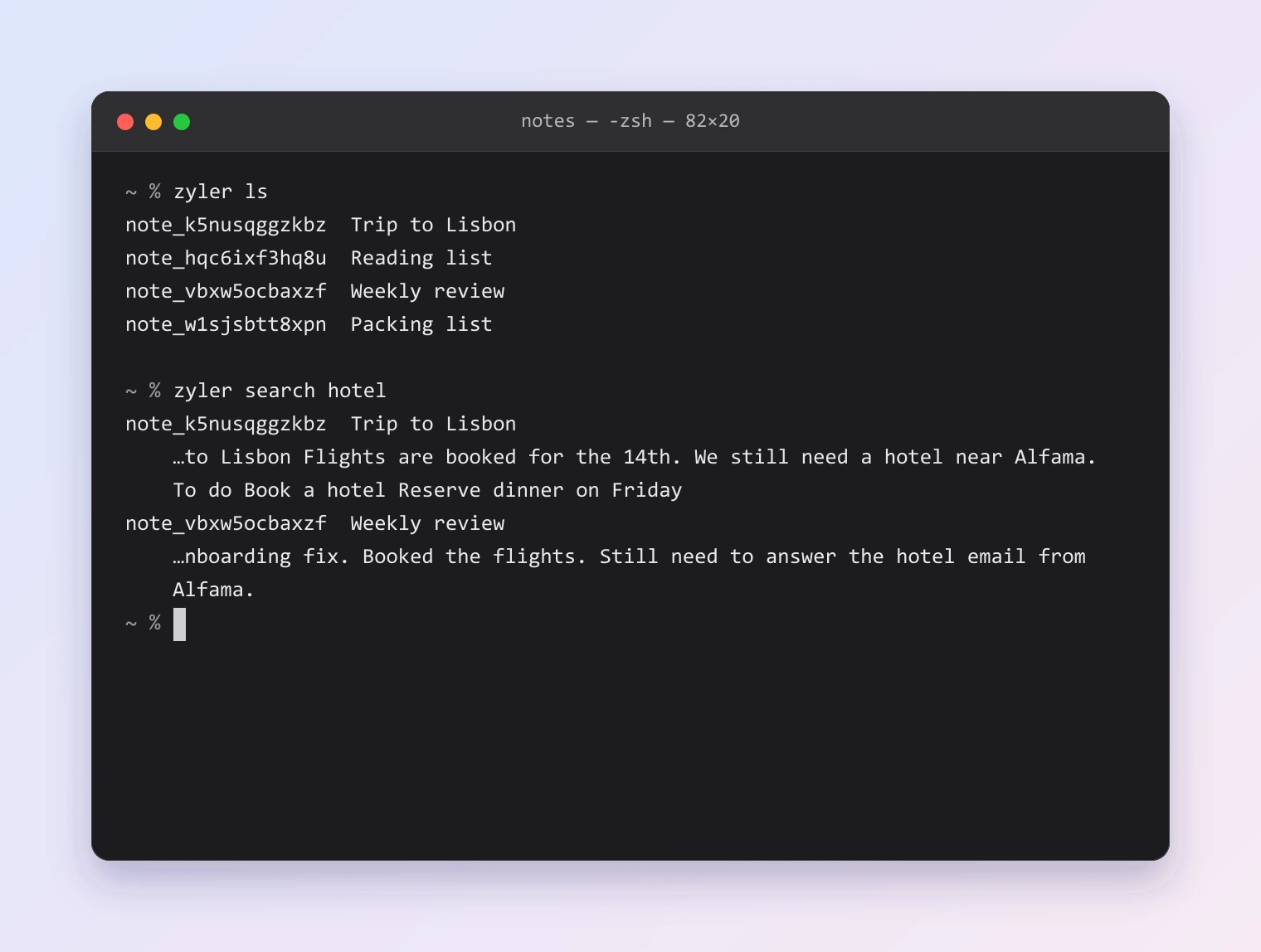
The first column is each page's id. Any command that takes a page accepts either the id or the full title.
To change something, an agent quotes the exact text it wants to replace, and
zyler cat shows the result.
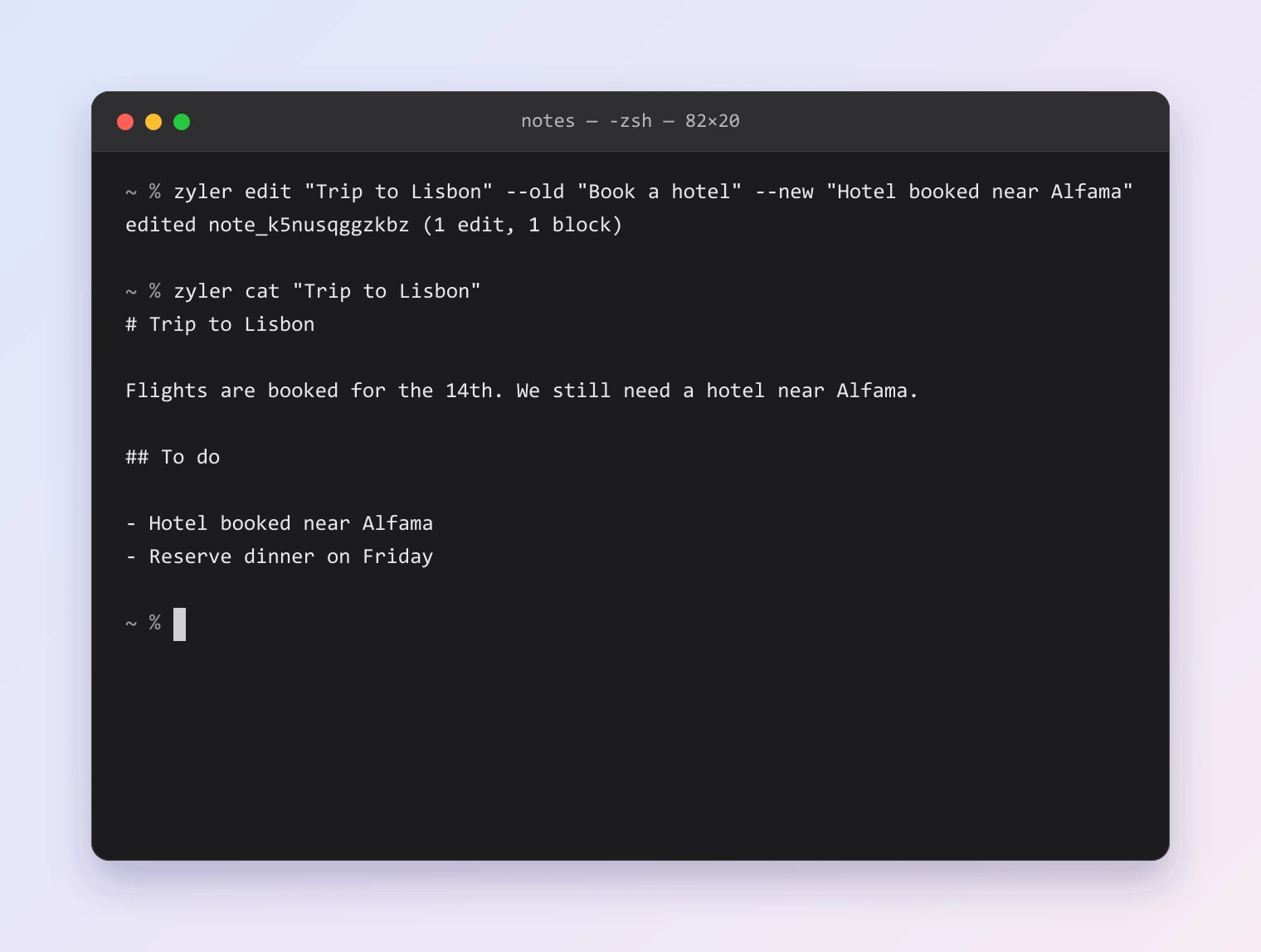
The tool runs on your computer, against the vault folder you already have. It does not need the Zyler app to be open, and it does not need a Zyler account. It reads and writes Markdown, and it uses the same engine as the app, so a page an agent writes is a normal page.
To set it up, turn on the command line tool in Settings, then General. Run
zyler help to see every command and zyler help markdown to see the Markdown
it understands.
What you give up
- No AI inside the editor. There are no inline suggestions and no "ask AI" menu.
- The command line tool is part of the desktop app. There is no AI on iPhone or iPad.
- You work through a terminal or an agent app. That is a good fit if you already do, and an extra step if you do not.
- Zyler cannot make an AI private for you. When an agent reads a page, that page goes to the provider you chose.
If you want an AI built into your notes app, Zyler is not that, and we would rather say so now.
Learn more
- How Zyler Sync encrypts your notes: what the server can and cannot see.
- Zyler Sync: what Sync does and what it costs.